
Long story short
Compartment is a self-hosted platform for deploying applications, including internal tools built with AI. At the start of the project, it operated entirely through the CLI, with no web console for managing deployments, access control, logs, or routes.
My role was to design that console and establish a design system, DesignOps practices, and an AI-assisted workflow. The goal was to help the team keep pace with engineering and evolve the platform independently, without relying on a designer for every new screen.
Problem
This console can’t run on library defaults. It needed its own rules - for screens, states, permissions, tokens, and components - plus a clear line between what the UI owns and what the platform handles underneath.
Solution
I built the console’s UI/UX foundation on shadcn, Tailwind, and Radix: theme and color logic, access-management flows, role/scope architecture, and a drawer pattern for editing without losing your place - then wrapped it in an agentic workflow for building and reviewing new screens.
Result
Design decisions stopped living in my head and became explicit, repeatable, and reviewable. I shipped 5 Codex agents and 5 reusable skills plus a design-audit pass, which helped get the product ready for its first enterprise client - so new platform work can start from product intent, reuse production patterns, and clear a structured audit before handoff.
Context
Compartment is a self-hosted platform for deploying and running applications, with a focus on internal team tools, including those built with AI. It simplifies deployment and sharing by providing built-in access control, routing, and logs. The engineering was already serious; what was missing was a way for design to move at the same speed. I came in to build that layer: a system, a way of working, and an AI workflow so the console could keep growing even when no one had drawn a Figma screen for it yet. It originally operated entirely through a command-line interface (CLI), with no web interface for managing deployments, access controls, logs, or routes.
My task was to design a web platform that would give developers a clear visual overview of everything they managed through the CLI. My main priority was to create a design ops that would enable the team to continue developing the platform independently, without relying on a designer.
This was design-ops for a fast-moving infrastructure product - I sat across product design, design engineering, and AI-assisted implementation. Because the console is a control plane over the platform’s deployment workflows, every design choice had to respect the real constraints underneath: contracts, permissions, org context, route ownership, and the system’s architecture.
! Problem
Compartment had a strong engineering foundation, but the console UI had to make a complex access model understandable and safe to use.
The main challenge was not just creating screens. The product had roles, scopes, permissions, organization/project boundaries, and many operational states that needed to be clear for users and consistent for the team.
Access logic was complex
Roles, scopes, permissions, and org/project boundaries were hard to understand at a glance. Users needed a clearer way to review, edit, and move through access-management flows without losing context.
AI-generated UI was not reliable by default
AI could create screens quickly, but the output often missed product logic, edge cases, required states, or used components in a generic way that did not fit Compartment’s access model.
Mockups and component libraries were not enough
shadcn, Tailwind, Radix, and Helium UI gave the team a strong starting point, but they still needed product-specific rules, reusable patterns, and an audit loop so new screens could stay consistent without a designer involved every time.
Design challenges
Compartment needed more than a set of finished screens because the product would continue growing after my work was done.
I created reusable patterns and simple rules for building new screens: how to structure them, which states and components to include, and how they should work with permissions and the backend.
This meant the team didn’t need to wait for a new Figma mock every time. They could reuse existing decisions and involve a designer when the problem was genuinely new or unclear.
Solutions
What was done an what benefits were achieved for each solution:
Visual & component foundation
First I shaped the basics - theme, color logic, density, and overall style - so the console read as Compartment, not as off-the-shelf library UI.
Then I pinned down how the core patterns behave across the product: buttons, tables, forms, badges, drawers, and every state that’s easy to forget - empty, loading, error, disabled, and destructive.
The payoff: the team finally had a consistent way to reach for shadcn, Tailwind, and Radix instead of guessing each time.
Access management, made legible
I took Compartment’s access model and turned it into UX flows people could actually follow - around scopes, roles, permissions, and org/project boundaries.
I added breadcrumbs to help users understand where they were in the platform and introduced drawer patterns, so users could inspect a person, role, or permissions without leaving the current screen and losing context.

AI Workflow
The team needed a way to keep developing the console without a full-time designer embedded in every workflow. My role was to turn design knowledge into something reusable: Codex agents, skills, references, and an audit layer that could help the team plan, build, and review UI more consistently.
This became one of my core contributions: a design-ops system that teaches Codex how to work with Compartment platform screens.
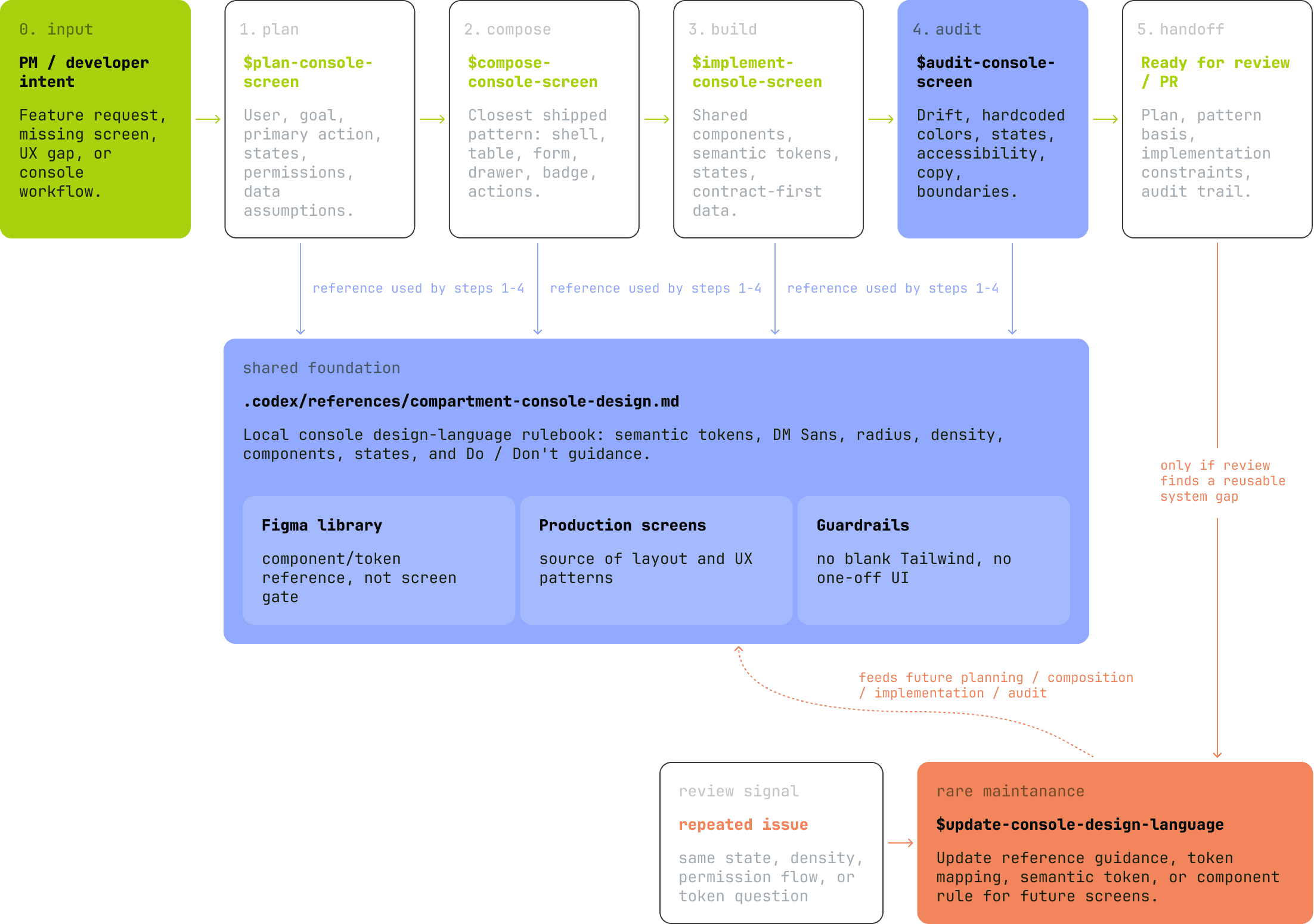
I created 5 Codex agents and 5 reusable skills. Together, they help transform a feature request, missing screen, or UX gap into planned, composed, implemented, and audited console UI.
The workflow keeps new screens aligned with Compartment’s product logic, shadcn/Tailwind/Radix components, required states, permissions, and design rules.
Agents
Agent 01
product-screen-planner
Turns intent into purpose, primary action, success path, states, and contract assumptions.
Agent 02
console-screen-composer
Composes screens from production patterns instead of starting from blank.
Agent 03
frontend-ui-implementer
Builds with shared components, semantic tokens, Tailwind, shadcn-style primitives, and Radix.
Agent 04
console-quality-auditor
Checks states, accessibility, copy, component usage, action hierarchy, and design drift.
Agent 05
console-architecture-guardian
Guards CLI-first contracts, package ownership, permissions, organization context, and boundaries.
4+1 skills:
Skills
Skill 01: plan
$plan-console-screen
Product job, primary action, success path, states, permissions, route/data assumptions.
Skill 02: compose
$compose-console-screen
Production exemplar + component tree + design.md rules + optional Figma component reference.
Skill 03: build
$implement-console-screen
Code in packages/console using shared components and semantic tokens.
Skill 04: audit
$audit-console-screen
Design-system, UX, accessibility, states and architecture boundary review.
Skill 05: RARE
$update-console-design-language
Only for real system gaps: token mapping or stale design.md guidance.
Here's how it runs in practice. A PM, a developer, or an AI coding agent can ship a new Console screen without waiting on a separate Figma mockup.
Before any UI code is written, the agent has to clarify the intent, define the screen plan, find the closest existing production pattern, and pull the shared visual language from compartment-console-design.md.
Only then does it build - shared components, semantic tokens, Tailwind, Radix, and shadcn-style primitives - and the result gets audited for drift: hardcoded colors, one-off UI, missing states, unclear actions, accessibility gaps, or broken boundaries.
And when review keeps surfacing the same gap, that fix goes back into the system - design language, token mapping, component rules, or references - so the next screen starts from stronger ground.
Research, Discovery & Validation for product decisions
Reading the product & access model
I went through the console structure, roles, scopes, permissions, org/project boundaries, and who really owns each workflow underneath - to figure out what the UI should carry, and where it should stay out of the way.
Testing the flows
I put the access-management flows in front of users and stakeholders to see if role details, drawers, entry and exit points, and permission logic actually read clearly. Their feedback is what simplified how people review and edit access without losing their place.
Pressure-testing components & agents
I checked how shadcn, Tailwind, and Radix held up against Compartment’s theme, states, forms, tables, drawers, badges, and errors - then ran the agents and skills on real console tasks to be sure the workflow could carry actual product work, not just demos.
Impact & Results
The real result: a system the team kept using long after my hands were off the design.
Business outcomes
Helped get the product ready for its first enterprise client.
Took the designer out of the loop for every small UI call.
Gave the team a way to keep shipping console screens without a designer in the team.
Made access-management flows easy to follow - and easy to explain to others.
Let the product move faster while actually getting more consistent.
Process & Design outcomes
A Compartment-specific UI foundation on top of shadcn, Tailwind, and Radix.
Clear patterns for roles, scopes, permissions, drawers, lists, details, and the empty/error states everyone forgets.
5 Codex agents and 5 reusable skills for planning, building, reviewing, and improving console UI.
A design-audit pass that catches missing states, drift, misused components, hardcoded colors, and accessibility gaps.
Design knowledge that now lives in the team and in Codex - not locked in Figma or in my head.
Reflections & Takeaways
The most valuable thing I made here wasn’t a screen - it was a system the team could run without a designer (that's questionable of course as I am pretty sure AI will not change designers in the nearest time). I shaped the visual direction, the access-management UX, the component rules, and the agent workflow.
Reflection
Biggest takeaway: designer can work like an engineer (limited version of it, but anyway).