ORB Studio: a playground for custom voice assistant orbs
While I’m currently looking for my next opportunity to keep growing as a Product Designer, Design Engineer, I built a pet project that feels very close to the direction I want to move in.
The project is called ORB Studio.
It is a playground for creating customized, voice-reactive orbs that can be used as a visual layer for AI and voice assistants.
How it started
The project started almost accidentally. I was watching a webinar about setting up agentic environments for design projects. During the session, they were building an application with a voice assistant. At some point, I stopped focusing only on the technical setup and started thinking about the visual representation of the assistant itself.
That voice assistant was represented by some kind of primitive blob, orb, or pulsing shape. But at one point this generic visual layer must become more individual, expressive, and connected to the product itself.
So how to make it more customised and have a control over each tiny detail of this orb? That question became the starting point for ORB Studio.
The unknown
At first, I had no clear product vision. I was mostly curious.
I’ve always found this kind of interface a little magical: a visual object that reacts to voice, changes its behavior, and creates the feeling that there is something alive behind the interaction and just in general looks like a little blob of magic. So I started asking ChatGPT what technologies are usually used to build voice-reactive visuals, how audio data can drive animation, and what the architecture of such an experience might look like.
Then I used ClaudeCode as a coding partner while building the prototype: to test implementation ideas, refactor components, debug unexpected behavior, and move from vague visual ideas to working interactions.
It was not a “generate the whole app” process. It was much closer to a design engineering collaboration: I was shaping the concept, making visual decisions, testing the experience, adjusting behavior, and using AI tools to speed up the technical path between idea and prototype.
The first MVP
The first MVP was very rough and messy. I experimented with different types of visuals: particles, lines, orbs, twisted shapes, animated paths, and reactive elements connected to voice input. A lot of it did not look good, but it worked! It reacted to sound and moved. It gave me a playground where I could test ideas quickly and understand which direction felt the most interesting.
That early version was important because it helped me stop thinking about the project as a single “voice assistant animation” and start thinking about it as a configurable visual system.
Narrowing the focus
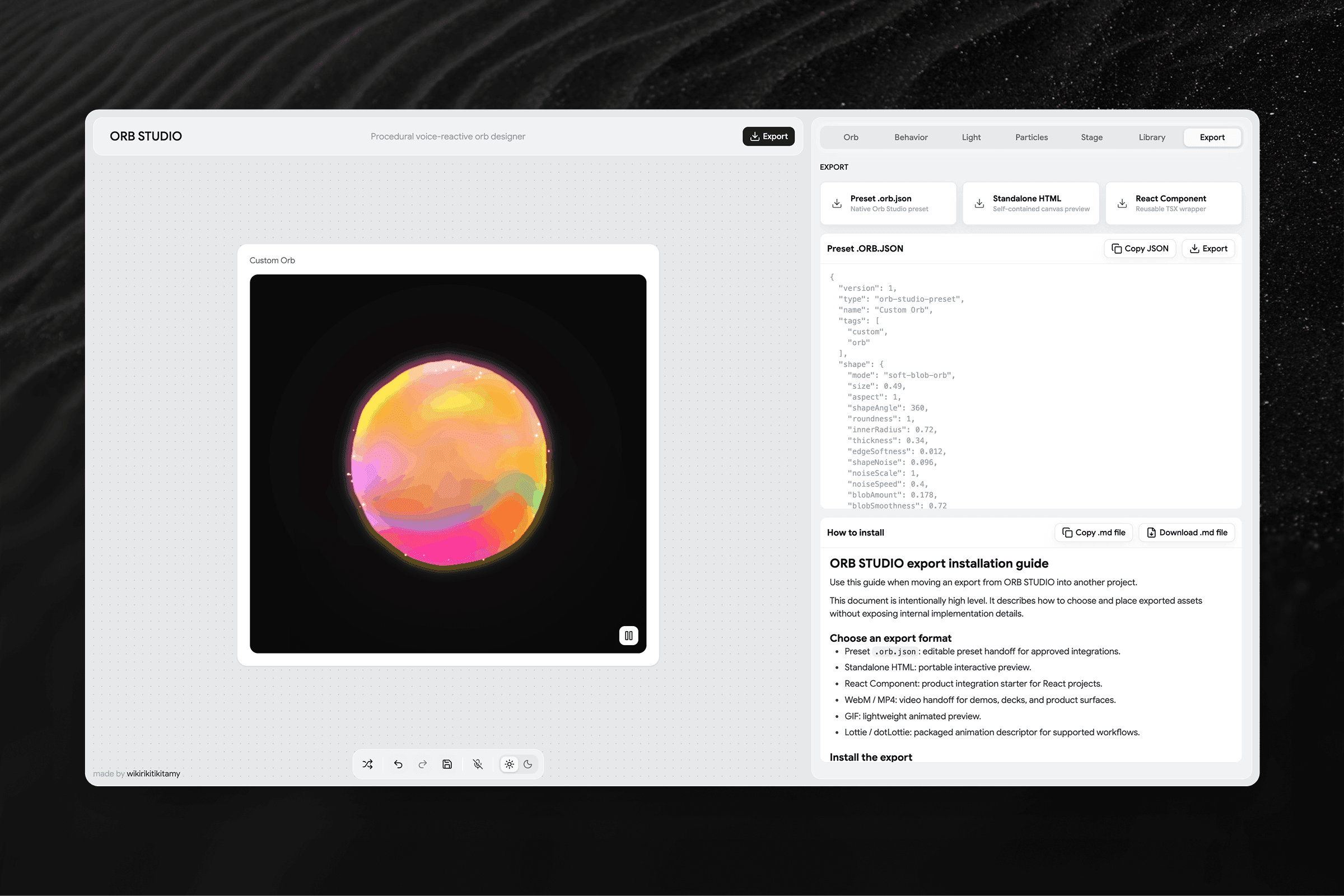
As I kept adding more settings and visual controls, I realized that trying to build every possible voice visualization was too broad and ambitious (yes…) for one pet project. My interest slowly shifted toward one specific direction: orbs and donut-like animated forms. They felt flexible enough to be expressive, but focused enough to become a real system. I started improving their style step by step, adding more parameters, better animation behavior, and more ways to customize the final result.
What now?
So I am at a stage when ORB Studio is a client-side playground where user can create a customized animated orb for your product. The idea is simple: instead of using a generic voice assistant blob, you can shape something more unique. You can adjust the visual style, movement, behavior, and voice-reactive animation. The goal is to make the assistant feel like part of the product’s identity, not just a default technical component.
At the current stage, ORB Studio already supports a wide range of visual variations. It is still a work in progress, but it is far enough that I can finally show what the project is becoming.
Current challenge: performance
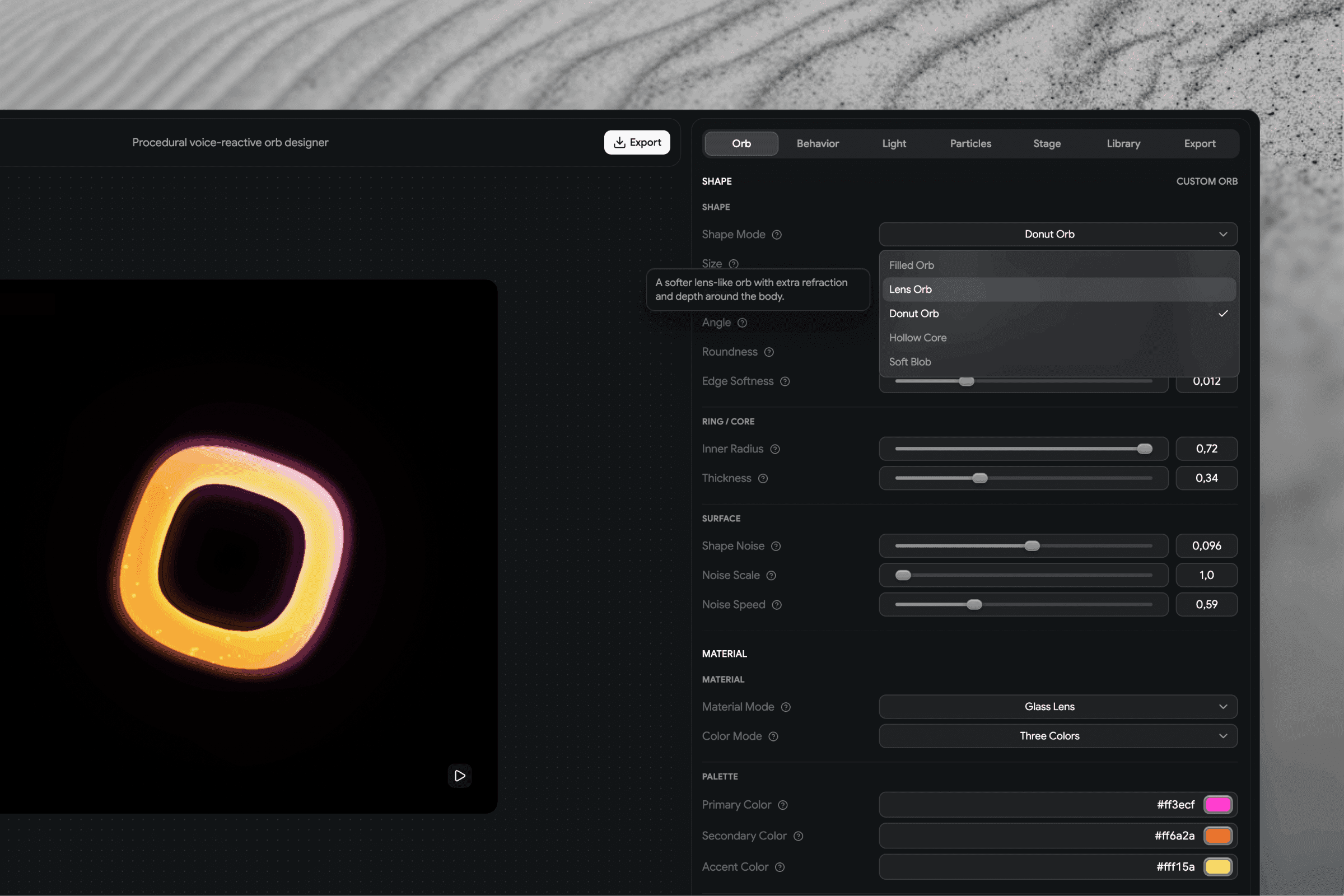
The main thing I’m working on right now is performance. As the customization system became more powerful, the visual layer also became heavier. Before releasing it publicly, I want to make sure the experience feels smooth enough and does not break when users start pushing the settings further.
So the public release is slightly delayed, but for a good reason.
What I want to add next
The next big step is to connect the playground with a custom AI API. Right now, the main way to create variations is through manual controls and sliders. That is useful for exploration, but I want the next version to feel more intelligent.
The idea is to let users describe the kind of assistant they want to create and generate or adjust the orb based on that input. Not just “move this slider,” but something closer to: “Create a calm assistant for a meditation product.” or “Make it feel more energetic, premium, futuristic, soft, playful, or technical.”
Another one thing I want to add is Modes: Thinking, Talking, Waiting in silence. This is a very important UX feature that should be in every Voice-assistant, as it has more of modes than just resting or speaking. {UPD from 27 June: Already implemented.}
Results and reflection
Tech stack
ORB Studio is built as a client-side Vite React SPA.
Current stack:
React 19.2.7 + ReactDOM
TypeScript with strict mode, ES2022, react-jsx
Vite 8 for build and dev server
Tailwind CSS 4 via @tailwindcss/vite
Radix UI for UI primitives
lucide-react for icons
class-variance-authority for component variants
Vitest, ESLint, Prettier, and TypeScript for testing, linting, and code quality
For the building process, I used ChatGPT, Codex, and Claude Code as part of my workflow: for research, implementation support, debugging, refactoring, and faster iteration. There is no separate backend at this stage. The project is currently focused on the playground experience, visual generation, customization, and voice-reactive behavior.

Why this project matters to me
ORB Studio started as a small curiosity and turned into a very practical exploration of the kind of work I want to do more of. It combines product thinking, visual systems, motion, frontend development, AI tools, and interaction design.
It also reminded me how much I enjoy building systems: tools where visual decisions can be explored, adjusted, tested, and turned into something reusable. This is still a work in progress, but it already feels like a meaningful step in my transition toward more design engineering work.